// WooCommerce plugin
SaleCraft – Sale Scheduler & Campaign Manager for WooCommerce Sell what isn’t selling. Run every sale from one calendar.
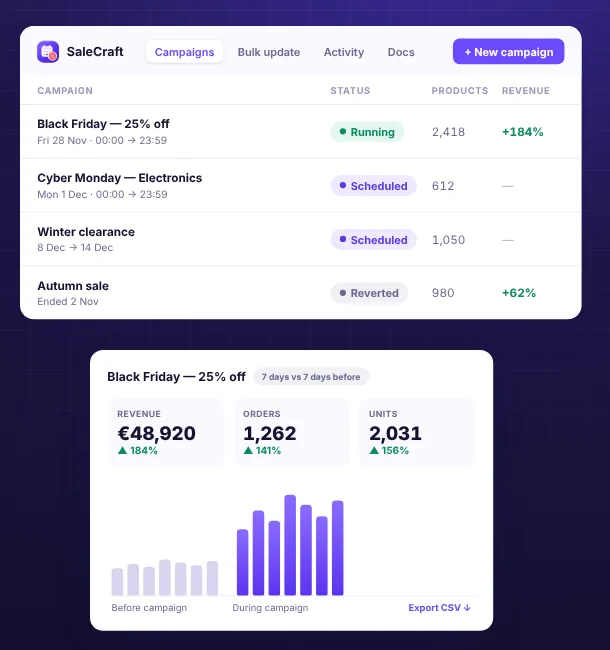
SaleCraft is a sale scheduler and campaign manager for WooCommerce. Slow stock goes on sale by itself every month, Black Friday is set up in a few clicks, prices start, end and go back on their own, and every sale gets a revenue report.
- Scheduled
- Previewed
- Undoable
New Sold on WPBay. Try every feature in the live demo first, no sign-up needed.
-
01
Slow stock moves on its own
Tell SaleCraft what “slow” means, such as “not sold in 60 days”, and it puts those products on sale for a week every month, then puts the prices back. Each run picks what is slow at that moment.
-
02
Every sale runs itself
Pick a template (Black Friday, Cyber Monday, a weekend flash sale, clearance), check the preview and schedule it. Prices change at the start and go back at the end.
-
03
You see what each sale earned
Revenue, orders and units during the sale against the same days before it, so you know whether the discount paid off.
// Scheduled campaigns
Black Friday at midnight. Nobody has to be awake.
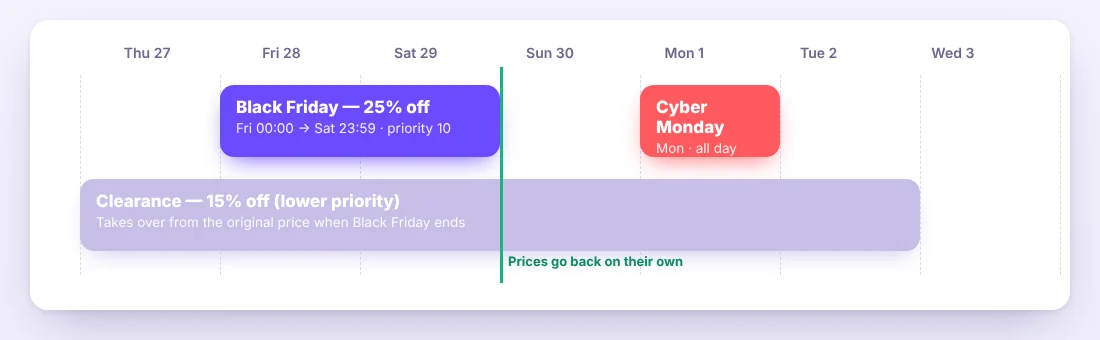
Plan every sale on a month and week calendar. Campaigns start and end in your store’s timezone, safely across daylight-saving changes, and can repeat every weekend, every two weeks or every month.
- Templates: slow sellers, Black Friday, Cyber Monday, weekend flash sale, clearance
- Recurring campaigns and one-click Duplicate
- Priorities settle overlapping sales, and you see overlaps before you schedule
- Email and Slack notifications when a sale starts, ends or could not run
// Preview before anything changes
See every product, before and after.
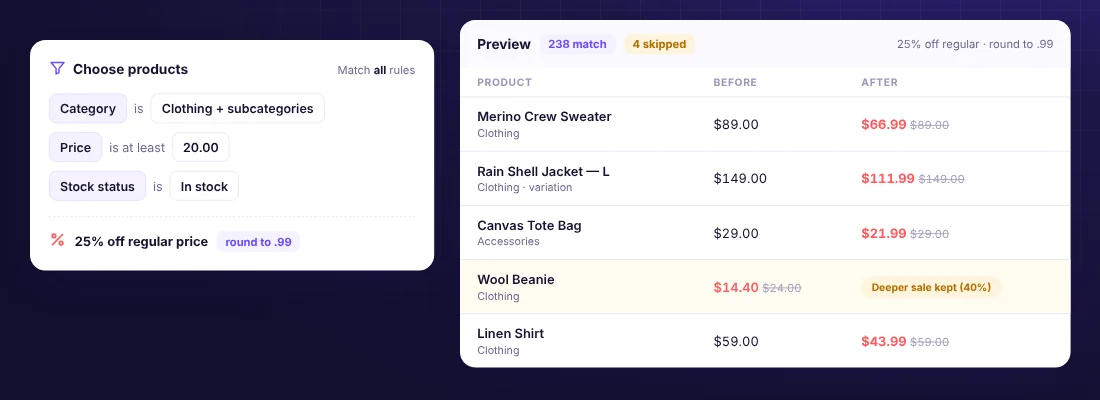
Choose products with rules such as “Category is Tents” and “Last sold more than 60 days ago”, set the discount, and preview every product, including the ones that will be skipped and why.
- Rules for category, tag, attribute, price, stock, status, dates, custom fields and IDs
- Slow-seller rules: units sold in the last N days, last sold or never sold
- Whole variable products or individual variations (“size L only”)
- Percentage, amount or set price, rounded to a step or a .99 ending
// Sale performance
See what every sale earned.
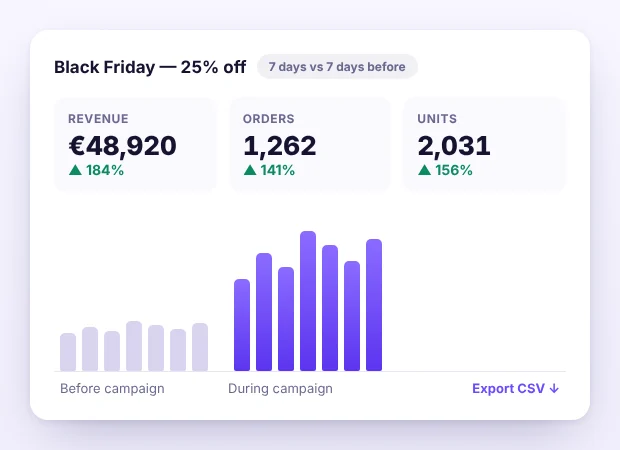
Each campaign has its own report: revenue, orders and units for the products it changed, next to the same number of days just before it. The Reports tab compares all your sales side by side.
- Paid orders only, refunds taken off
- Best sellers and CSV export
- No WooCommerce Analytics needed
// EU Omnibus directive
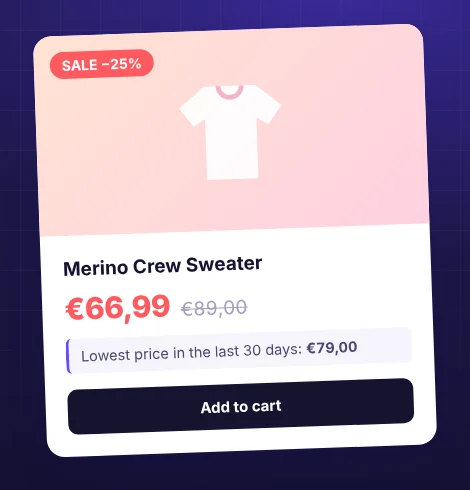
Lowest price in the last 30 days, shown for you.
SaleCraft keeps a full history of every price change (hand edits, imports, the REST API, WooCommerce’s own scheduled sales and campaigns) and shows the lowest price in the last 30 days under sale prices, on any theme and in the block cart.
- On automatically for EU stores, or on and off by hand
- Per variation, with your own wording
- Product pages only or everywhere
// Dokan marketplaces
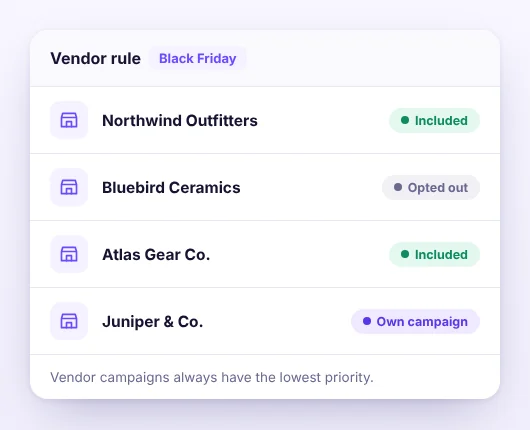
Your sales come first. Vendors stay in control.
On Dokan marketplaces, include or leave out stores by name, let vendors opt out, and optionally let them run their own campaigns on their own products, always below your store-wide sales.
- Vendor rule to include or leave out stores
- Optional vendor opt-out
- Vendor campaigns and quick changes in the Dokan dashboard
// Safe on a live store
Undo anything. Lose nothing.
SaleCraft is made to be left running on a real store with real orders.
-
Hand edits are kept
When a sale ends, only the prices SaleCraft set are restored. If someone changed a price by hand in the meantime, that edit stays.
-
Priorities for overlaps
When two campaigns want the same product, the higher priority holds it. When it ends, the other takes over from the original price.
-
Deeper sales never raised
A 20% campaign does not replace a product that is already 40% off.
-
Safe defaults
New rules include published products only, and an empty filter matches nothing.
-
Nothing half-applied
A campaign whose scheduled tasks did not run is marked “Did not run” and changes nothing.
-
One-click revert
End any running campaign early, and undo any quick change exactly.
// How it works
Five steps. Zero surprises.
-
Step 01
Choose products
Start from a template or from scratch, and pick products with rules.
-
Step 02
Choose the change
For example 25% off the regular price, rounded to .99.
-
Step 03
Preview
Every product before and after, and anything skipped.
-
Step 04
Schedule
Once or repeating. It starts and ends on its own.
-
Step 05
See how it went
Compare the sale with the days before it.
// Everything else
Everything in one place.
On your storefront
- Sale badge with the campaign’s name
- Countdown to the end of the sale
- Campaign products block and shortcode
Quick changes
- Prices, stock, status and visibility
- Shipping, tax, categories, tags, brands and attributes
- Find and replace in names, descriptions and SKUs
- Preview first, undo exactly
Admin
- One screen under WooCommerce › SaleCraft
- Activity log with adjustable retention
- Scheduled tasks health card and dashboard widget
- Export and import campaigns as JSON
- Built-in documentation
// Compatibility
Tested where your store runs.
- WordPress
- 6.4 – 7.1
- WooCommerce
- 8.0 – 11.2
- PHP
- 7.4 – 8.4
- HPOS
- On & off
- Dokan Lite
- 5.3+ (optional)
- Themes
- Storefront · Astra · TT25
- No tracking, nothing loaded from other sites
- Translation-ready (.pot)
- Hooks for developers
// FAQ
Questions store owners ask.
What happens to a product I edit by hand during a campaign?
Your edit stays. At the end, only values that still hold what the campaign set are restored.
Two campaigns discount the same product. Which one applies?
The one with the higher priority (on a tie, the one that started later). When it ends, the other takes over.
Where does the “Lowest price in the last 30 days” come from?
From a history of every price change the plugin records from activation on, including hand edits and imports. Turn it on, off or automatic (EU stores) under WooCommerce › SaleCraft › Settings.
Does it need a server cron job?
Background work runs on WooCommerce’s Action Scheduler and needs WP-Cron or a server cron job. If your site gets little traffic, run wp-cron.php from a server cron every minute.
What does deleting the plugin remove?
By default only its queued tasks; its data stays for a reinstall. Tick “Delete all data” in its Settings before deleting to remove campaigns, history, the activity log and settings too.
More answers in the full FAQ and the documentation.
// Built by BrainCraft.rs
Need something SaleCraft doesn’t do?
We build custom WooCommerce and e-commerce features for stores every day. Tell us what you need.